Troubleshooting
Common Issues
Shuttle and Backplate Resistance
-
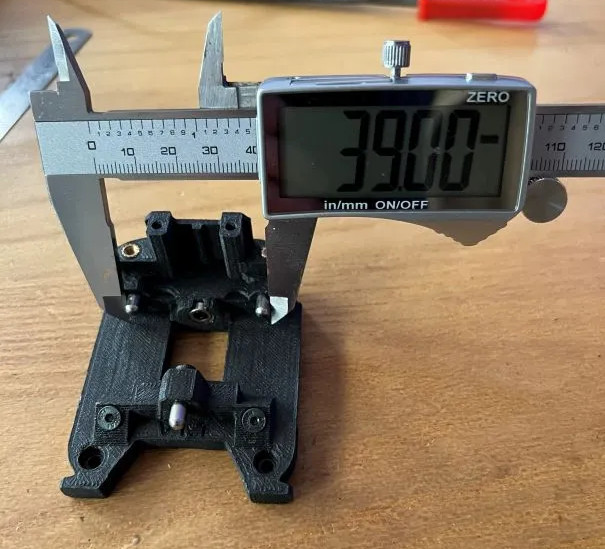
Measure the outside of your top pins. You should have 39mm.
-
See Print Tuning
-
If you have calibrated your print and still experience issues, you may want to try the heat treatment method or you can try cleaning out the bushings:
Heat Treating
If you printed the shuttle and backplate and things are just not smooth or you have slight binding, you can Heat Treat it and here is how.
- Fully assemble the shuttle and backplate with Bushing, Pins, Screws and Magnets
- Set your heat bed to 100-110°C
- Once at temperature, mate both parts fully, and set them on the bed with the backplate (tool side) down
- After 20+ minutes pick them up and slide them 3-4 times, then fully mate them once again
- With both parts still fully mated, set them down with the backplate (tool side) down someplace flat and at room temperature and let them fully cool without touching the for 5+ hours
- Try and slide them again and you should feel an improvement, you can try this multiple times if you are still not satisfied
Big thank you to unguided-wanderer on Discord for this technique.
Cleaning Bushings
Sometimes the bushings aren't debured or do not slide well when you recieve them.
- Find a drill bit 4mm or smaller (I’m using 3mm in the video at the link)
- Using your thumb, apply pressure onto the bush and roll back and forth on the drill bit.
- Test on the pin again
- Rinse and repeat.
- Some bushings take multiple tries, but try not to over do it, just enough that the bushing falls on the pin.
Big thank you to BT123 on Discord for this technique.
Last Resort
If you can't get the Shuttle and Backplate to mesh cleanly after attempting heat treatment and cleaning the bushings, you can try heating the pins with a soldering iron. This is a last resort and should only be done if you have tried everything else.
- Heat up the pin with a soldering iron.
- While the pin is hot, push it into the backplate with pliers (don't burn yourself!)
- Quickly put the backplate or tool onto the shuttle while the pin is still hot and make sure it seats fully.
- Wait 5-10min to let it cool down and settle.
- Tighten the pin with a screw or epoxy it in place.
Big thank you to Sebastiaan on Discord for this technique.
Gantry Can't Reach the Bed
Some tools are shorter than others and with some of the shorter tools the z-rail carriages reach the end of their travel before the nozzle can reach the bed, this can be a problem for probing, QGL and printing.
- Remove or modify the Z-belt-covers
- Use taller bed spacers
- Some tools like A4T & XOL require the use of lower profile Z joints. hartk's GE5C Z Joint or Ellis' Short Z Joints are good options.
Inconsistant QGL
- Make sure the umbilical cable is not pulling on the toolhead as it probes.
- Check preload screws.
Bad Input Shaper Results
- Ensure the Backplate's preload screws have been adjusted.
- Check your configuration to ensure the correct accelerometer is assigned to
[resonance_tester]or the correct accelerometer parameter was specified in the macro. Consult the Resonance Calibration section for more information.
Community
StealthChanger has an active and growing community of people who are willing to help. If you're having trouble finding the information you need, consider reaching out to our communities on Discord or facebook and be sure to mention that your issue could not be resolved by the information here. We will do our best to help you and update this documentation accordingly. Please feel free to contribute yourself.